
Showing posts with label blogger. Show all posts
Showing posts with label blogger. Show all posts
Tuesday, June 29, 2010
Blogger Improvement

Saturday, August 16, 2008
The New Blogger Update
 Blogger team must been busy updating the Blogger system lately. There a few new enhance features published and I love it all especially the Blogger gadget. Hmm, the update never this aggressive before, are they up to something...
The Blogger Gadget section is now more organized with tonnes of gadget possibilities. Even you can create your own gadget (must be hosted somewhere else though). Everything else is organize by Basic, Featured, Most Popular, Newest and several other categories.
The Blogger Dashboard also cosmetically enhance, which I find it just OK. The old functionality still there, Blogger just enhance the CSS design of the blog list.
They also enhance the AdSense page element by enabling the image Ad. They found that image ads have a higher click-through rate so the user could get richer. Hahaha. I think the text link ad is could perform much better. Unless if they enable the video ad, now that is a different story.
With these updates, I think that the Blogger is considered one of the easiest blogging tool out there compared to others. It is about time that I contribute something to the Blogger user. Perhaps some kick-ass template or gadget. You can click on the link with the Blogger Template label on the right in future (of course when it is clickable).
Wednesday, July 30, 2008
Blogger is now in Malay

I saw this on Blogger Buzz
Here’s a quick summary of recent fixes and changes we’ve made to Blogger:
Blogger is now available in Malay! Blogger has a large base of users in Malaysia and we are excited to now bring them Blogger in their native language.
Basically all wording for each Blogger function are now replaceble into Malay language. If you ask me, this is rather useless as the minimal education here in Malaysia require you to passed the English subject even from primary or secondary school.
Wednesday, December 13, 2006
Blogger Beta Hack - Label Cloud
 I really wanted to re-arrange the Blogger Beta label into a better visual presentation, like above. Today I got some free time to play around with it. So I searched through and Phydeaux hack matched my criteria. Read on his blog entry for more details.
Tuesday, December 05, 2006
Blogger Beta Hack : Peek-A-Boo Navbar
Originally posted in Bloggeratto, this piece of code will make your blogger Navbar remain hidden but when you move the cursor on it it will slide down but this is only fully supported on Firefox, Iceweasel(linux),Flock, MZS6,Netscape, Safari & camino(linux).
Just add this 2 lines code in the CSS right before the "body {"
There are many other hacks available out there and on my mind that I would like to try out but I'm not in a hurry here.
Just add this 2 lines code in the CSS right before the "body {"
#navbar-iframe{opacity:0.0;filter:alpha(Opacity=0)}
#navbar-iframe:hover{opacity:1.0;filter:alpha(Opacity=100, FinishedOpacity=100)}
There are many other hacks available out there and on my mind that I would like to try out but I'm not in a hurry here.
Thursday, November 09, 2006
Blogger Beta Hack - Expandable post entry
 This is a very useful hack. The purpose of this hack is to display only the summary of your full article / story on the main page. When reader click the "read more" it shows the full article on the next page.
To me it is so important and I hope that Blogger Beta should add this feature ASAP, but I simply just can't wait. I've done it in previous Blogger build, so I look around and I found a Blogger user that dedicate himself to hack Blogger. Thanks Ramani (I think he is from India).
Anyway here are the steps.
- 1. Search for "post-header-line" to find this portion of code in your template and add the lines in as shown below.
<div class='post-header-line-1'/>
<div class='post-body'>
<b:if cond='data:blog.pageType == "item"'>
<style>.fullpost{display:inline;}</style>
<p><data:post.body/></p>
<b:else/>
<style>.fullpost{display:none;}</style>
<p><data:post.body/></p>
<a expr:href='data:post.url'>Read More......</a>
</b:if>
<div style='clear: both;'/> <!-- clear for photos floats --> </div> - (optional step) Goto Settings->Formatting. At the bottom, you will find the text box provided to specify the "Post template". Copy/paste these lines into that text box and save the settings.
Type your summary here
<span class="fullpost">
Type rest of the post here
</span>
With all the fuss you will be rewarded with at least double page views in your blog stats. Just make sure you don't reveal everything in the blurb.
Thursday, August 17, 2006
Blogger Beta Version
This is just an intro entry from me. Well I'm currently testing the Blogger Beta. I'm not so sure how to migrate my blogs from the previous version into this one. I did try but somehow my blogs is not supported. Weird. Well, let just try out all the feature first.
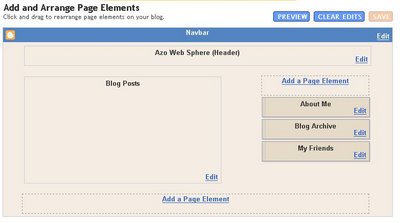 What so cool in this beta version is the template setting. The template layout is now controled by page element- the header, footer, blog post and the add-on element. This feature is so much alike the Google's Page Creator. Nifty idea.
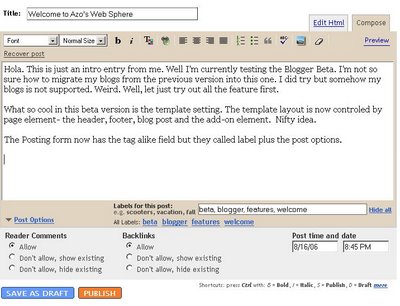 The Posting form now has the tag alike field but they called label plus the post options.
Now let see how well the Beta version handle the sample codes:
For conclusion, I think the Beta version has improved significantly and it shows how well Blogger listen to the comments / critics made by the user. I like most of the features, even the hack is also available. And you know what, the Blogger Beta was launched on my 30th birthday (14-Aug-2006) . Ahahahaha Kudos.
So what happen to The Blue Planet Explorer (PageRank 3) and The Grand Auto Club (PageRank 5) ? Woah look at the Google's page rank difference. It tells you that a specialized blog gain more traffic compared to all-in-one blog. I'm going to transform the Blue Planet Explorer blog into a travel / photography blog and hopefully I can move the Grand Auto Club into Blogger Beta. So now I have 3 blogs to look after. Cool.


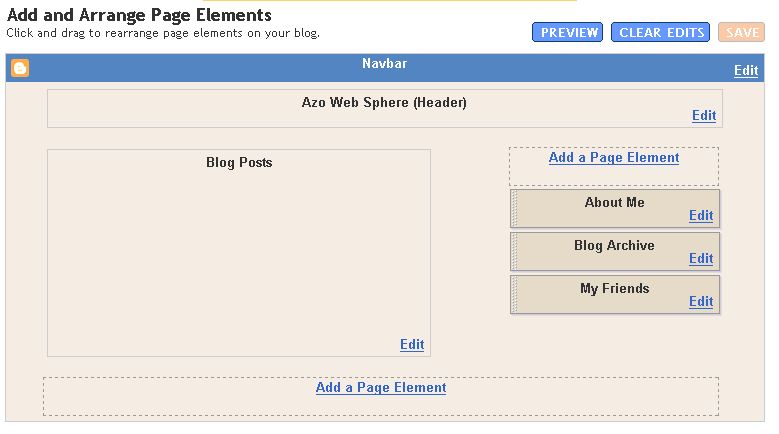 What so cool in this beta version is the template setting. The template layout is now controled by page element- the header, footer, blog post and the add-on element. This feature is so much alike the Google's Page Creator. Nifty idea.
 The Posting form now has the tag alike field but they called label plus the post options.
Now let see how well the Beta version handle the sample codes:
<cfquery name="GetContact1" datasource="#dsn_MainDB#" username="#dsn_user#"Oh well, I think it is still the same.
password="#dsn_pass#">
SELECT contact_id, name, state, address1, address2, city, district, postcode, country, phone, fax, email, website
FROM contact
WHERE publish = 1
AND sub_cat = 'DO
AND f_cat_id = '#TrailID#'
</cfquery>
For conclusion, I think the Beta version has improved significantly and it shows how well Blogger listen to the comments / critics made by the user. I like most of the features, even the hack is also available. And you know what, the Blogger Beta was launched on my 30th birthday (14-Aug-2006) . Ahahahaha Kudos.
So what happen to The Blue Planet Explorer (PageRank 3) and The Grand Auto Club (PageRank 5) ? Woah look at the Google's page rank difference. It tells you that a specialized blog gain more traffic compared to all-in-one blog. I'm going to transform the Blue Planet Explorer blog into a travel / photography blog and hopefully I can move the Grand Auto Club into Blogger Beta. So now I have 3 blogs to look after. Cool.


Subscribe to:
Posts (Atom)